Last checked 2026-11-17. Written by the Codebuddy team: we make one of the tools in this comparison, and we say where it isn't the right pick. Every claim links to a dated source at the end.
An AI tool can change a dozen files in a minute. Reading all of it at the end is the hard part, and it's where problems slip through. The fix is mostly about when and how you see each change: before it's written, one file at a time, in a diff you trust. Here are five habits that help, and how the main tools support them, with a source for every claim.
TL;DR
- Want to stay close to your code? Codebuddy (codebuddy.ca) writes a plan first by default, then shows each change in your IDE's own diff viewer, and applies only the files you tick. Nothing changes on disk until you approve it. It has no checkpoints of its own, so keep using git. [1][2]
- Want an agent you can still check per change? Claude Code, in Manual mode, shows each edit as a side-by-side diff and asks first, with Accept and Reject buttons per change. [3]
- Already in VS Code with Copilot? Copilot saves pending edits to disk, then you Keep or Undo each change; checkpoints are on by default. [4]
- Want every change in git history? Aider commits each edit, and /undo discards the last one. [5]
Stay close to your code
"You ask an AI tool for one change. It goes off on its own, edits twelve files, and comes back with, done. Now you own code you never really read." [1]
A giant change with pages of edited files is hard to review at the end, and you're still the one who answers for it. Codebuddy is built for developers who want to stay close to their code: it writes a plan before any code, by default, and you steer it until it's what you would have done. [1]
Then each change comes back as a diff in your editor's own viewer, and only the changes you tick get applied. [1][2]
That's the lens for this post. The habits below work with any tool; the table shows how each one supports them, in its vendor's own words.
Five habits for reviewing AI-generated code
None of these need a particular tool. They make the review smaller, earlier and easier to undo.
- Ask for a plan before any code. A plan is short enough to read properly, and the cheapest place to catch a wrong approach. Most tools now have one: Copilot's Plan agent, Cursor's Plan Mode, Claude Code's and Junie's plan modes, Cline's Plan mode. Codebuddy writes one by default. [6][7][3][8][9][1]
- Keep each change small. Ask for one change at a time. A diff you can read in a few minutes gets a real review; a twelve-file change gets skimmed.
- Review per file, in your IDE's own diff. A side-by-side diff in the viewer you already use makes it easier to see what moved. Claude Code opens changes in the JetBrains diff viewer; Codebuddy uses VS Code's merge editor or the JetBrains diff. [10][2]
- Know whether the files have already changed. Some tools write first and ask you to keep or undo; others ask first. In VS Code, Copilot's pending edits are already saved to disk; Claude Code in Manual mode asks before editing. [4][3]
- Keep a way back. Use checkpoints where your tool has them, and commit before you start either way. Copilot, Cursor, Claude Code, Cline and Kilo Code have checkpoints; Aider commits every edit to git. [4][11][3][12][13][5]
How we compared them
The first column is how each tool works with you, in its vendor's own words. The rest follow the five habits: is there a plan step, how are changes shown, what do you approve, have the files already changed when you're asked, can you roll back, and is there a mode that skips approval. Every cell links to the vendor's own docs or listing. A cell reads "Not stated" where we couldn't find a primary source.
Side by side
| Tool | How it works with you | Plan before edits | How changes are shown | What you approve | Files change before you approve? | Checkpoints / undo | Auto-approve mode |
|---|---|---|---|---|---|---|---|
| Codebuddy | Writes a plan first, by default; you tick which changes in the diff get applied [1] | Yes, by default; you steer the plan before any code [1] | Your IDE's own diff: VS Code's merge editor or JetBrains' diff viewer [2] | Per file: tick the changes you want [2][1] | No: only the changes you tick are applied [1][2] | No checkpoints of its own; use your IDE's undo or local history, or git [2] | None: you tick every change [1] |
| GitHub Copilot | Completions, Ask, and an Agent mode GitHub calls "an autonomous coding companion"; a plan agent for upfront plans [14] | Optional: a Plan agent (VS Code) or plan mode (JetBrains) [6][15] | Inline in the editor plus a multi-file diff of the session (VS Code); per-file review in Edit mode (JetBrains) [4][15] | Keep or Undo per change, per file or all at once (VS Code); Accept or Discard per file (JetBrains) [4][15] | Yes in VS Code: "Pending edits are already saved to disk" [4] | Checkpoints, on by default in VS Code [4] | Autopilot: approves file edits, terminal commands and tool calls [6] |
| Cursor | An agent in its own editor that edits files and runs commands [16] | Optional Plan Mode: a reviewable plan you can edit before building [7] | A diff view that "shows changes as they happen"; a Review pass when the agent finishes [17] | Not stated | Yes: "Suggest edits to files and apply them automatically" [16] | Checkpoints, created automatically before significant changes [11] | Not stated |
| Claude Code | An agent; in Manual mode it shows each edit as a diff and asks first [3] | Optional Plan mode: describes what it will do and waits for approval [3] | Side-by-side diff (VS Code); the IDE's own diff viewer (JetBrains) [3][10] | Per change, with Accept or Reject buttons (whole file over 100 changes) [3] | No in Manual mode: it asks before editing [3] | Checkpoints: rewind code to an earlier point [3] | "Edit automatically" and Auto modes edit without asking [3] |
| Cline | An agent with "a human-in-the-loop GUI to approve every file change and terminal command" [18] | Optional Plan mode: explore without changing files, then Act [9] | Not stated | Approve each file change and terminal command [18] | Not stated | Checkpoints: a snapshot after every file change or command [12] | Per-action Auto Approve, and YOLO mode, which approves everything [19] |
| Kilo Code | A "multi-agent control room": several agent sessions at once, each in its own git worktree [20] | Not stated | A diff summary on each agent turn; side-by-side diff per file [13] | Not stated | Not stated | Checkpoints version your workspace during tasks [13] | Auto-approve per action type; in JetBrains, file edits prompt for approval [21] |
| JetBrains AI Assistant | Inline help and next-edit suggestions, plus coding agents (Junie, OpenAI Codex, Claude Agent) [22] | Optional: Junie's Plan mode waits for your approval [8] | Junie lists changed files; click one to review it in the IDE [8] | Review per file; roll back all files at once [8] | Not stated | Rollback of the agent's changes [8] | Junie's Brave mode runs everything without asking [8] |
| Aider | A terminal tool that edits files and commits each change to git [5] | Optional: ask mode never changes files; architect mode proposes, then edits [23] | In the terminal: /diff shows changes since your last message [5] | Not stated | Yes: it edits, then commits each change [5] | Every edit is a git commit; /undo discards the last one [5] | Auto-commits by default (--no-auto-commits turns them off) [5] |
Each cell is from the vendor's own docs, listing or repository on the date checked. "Not stated" means we couldn't find a primary source.
Roo Code isn't listed: its README says it was shut down on May 15th, 2026. Windsurf is now Devin Desktop. [24][25]
The options, one by one
Codebuddy
Best for: Developers who want to stay close to their code: a plan they steer, then a diff they tick, one change at a time, in VS Code and JetBrains
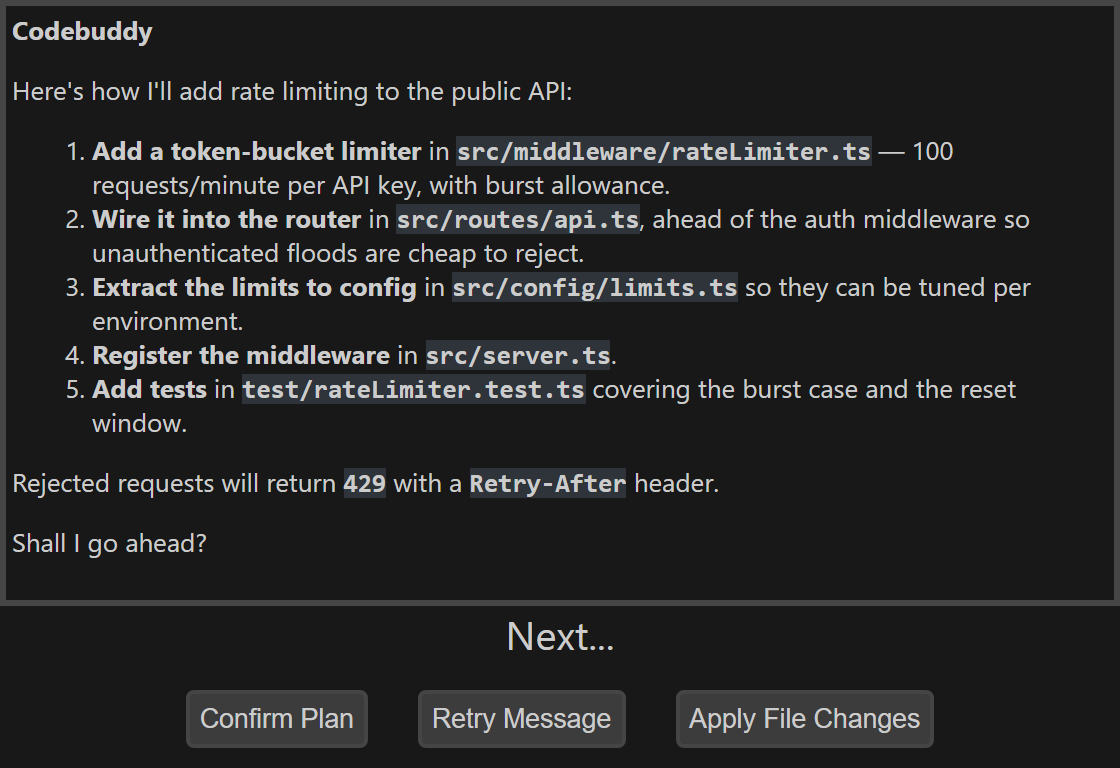
Codebuddy's plan, shown before any file changes.
Strengths
- Writes a plan before any code, by default, and you steer it until it's what you would have done. [1]
- Every change comes back as a diff in VS Code's merge editor or JetBrains' own diff viewer, and only the files you tick get applied. [2][1]
- Nothing is written until you approve it, so there's nothing to undo when you reject a change. [1]
- You decide which files the AI gets to see. [2][1]
Limitations
- No checkpoints of its own: use your IDE's undo or local history, or git. [2]
- No auto-approve mode, by design: it isn't built for handing a big task to an agent and coming back to a finished result. [1]
- Not open source, and no local models. [26][27]
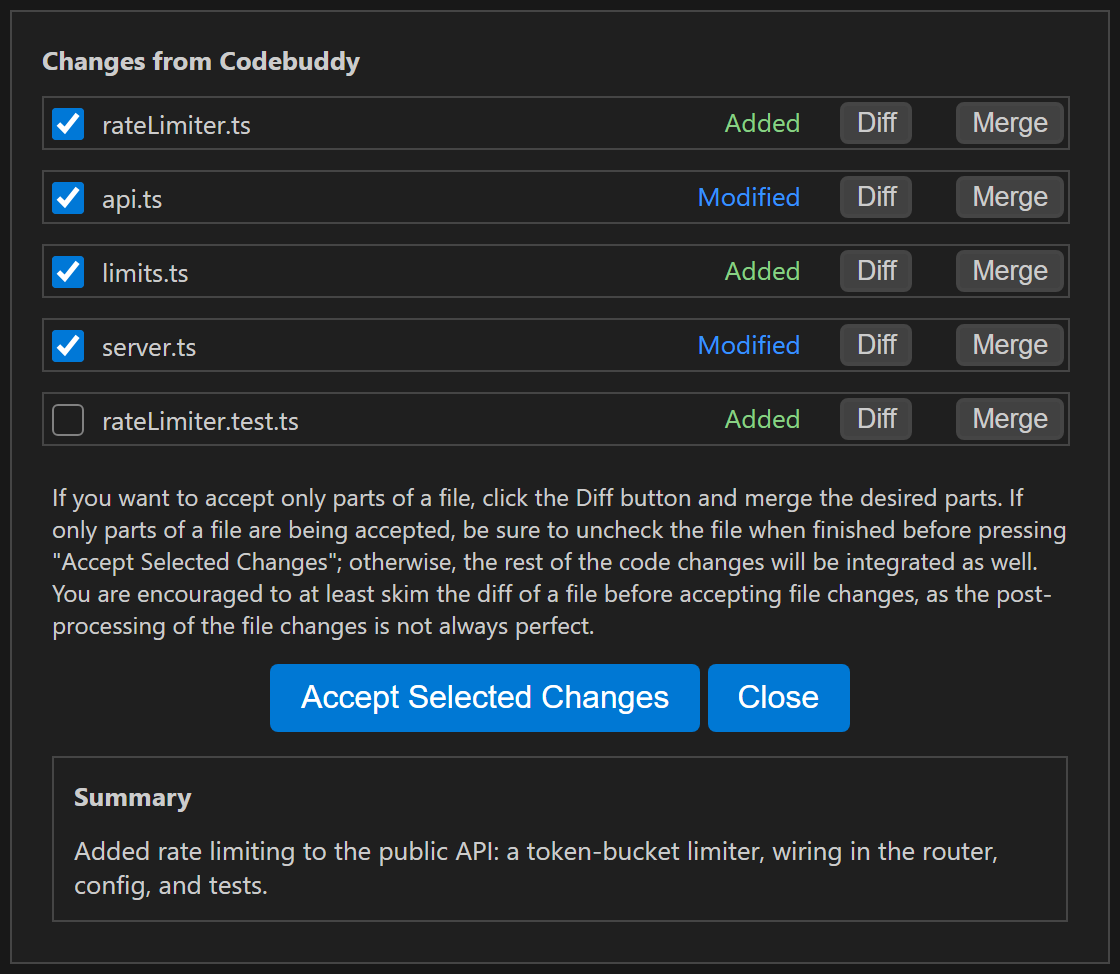
Each changed file has its own checkbox; only what you tick is applied.
Install for VS Code · Install for JetBrains · See pricing
GitHub Copilot
Best for: Copilot users in VS Code who want plans, per-change Keep/Undo and checkpoints
Strengths
- A Plan agent writes a plan for you to review before implementation. [6]
- Keep or Undo each change, a whole file, or everything at once, from a multi-file diff of the session. [4]
- Checkpoints are on by default in VS Code. [4]
- In JetBrains, Edit mode lets you Accept or Discard edits file by file. [15]
Limitations
- In VS Code, pending edits are already saved to disk while you review them, so tests and running apps see the changed files. [4]
- Autopilot approves file edits, terminal commands and tool calls automatically. [6]
Vendor site: github.com/features/copilot
Cursor
Best for: Developers who want an AI-first editor with an agent, plan mode and checkpoints
Strengths
- Plan Mode researches your codebase, asks clarifying questions and writes a plan you can edit before any code. [7]
- Checkpoints are created automatically before significant changes, so you can restore files. [11]
Limitations
- It's its own editor, not a plugin for VS Code or JetBrains IDEs. [16]
- Checkpoints are local and separate from git; Cursor says to use git for permanent version control. [11]
Vendor site: cursor.com
Claude Code
Best for: Developers who want Anthropic's agent in the terminal, VS Code or JetBrains, with per-change diffs
Strengths
- In Manual mode it shows each edit as a side-by-side diff and asks before applying it, with Accept and Reject buttons per change. [3]
- Plan mode, and checkpoints you can rewind code to. [3]
- Works in the terminal, VS Code and JetBrains IDEs. [3][10]
Limitations
- Diffs with more than 100 changes have no per-change buttons, so you review the whole file. [3]
- "Edit automatically" and Auto modes edit most files without asking, so review depends on the mode you pick. [3]
Vendor site: code.claude.com
Cline
Best for: An open-source agent that asks before each file change, with checkpoints
Strengths
- Asks you to approve every file change and terminal command by default. [18]
- Plan mode explores and strategises without changing files. [9]
- Checkpoints snapshot your project after every change, and Compare shows what changed. [12]
Limitations
- YOLO mode approves every action immediately, so review depends on how it's configured. [19]
Vendor site: cline.bot
Kilo Code
Best for: Running several agents in parallel, with a diff summary on every turn and checkpoints
Strengths
- A diff summary on each agent turn, with a side-by-side diff per file. [13]
- Checkpoints version your workspace during tasks. [13]
- In JetBrains, file edits prompt for approval. [21]
Limitations
- Kilo warns that auto-approve settings give it direct access to your system. [21]
Vendor site: kilo.ai
JetBrains AI Assistant
Best for: JetBrains users who want Junie's plan mode and per-file review inside the IDE
Strengths
- Junie's Plan mode prepares a plan and waits for your approval. [8]
- Click a changed file to review it, and roll back all changes at once. [8]
Limitations
- Brave mode runs everything without asking for confirmation. [8]
Vendor site: plugins.jetbrains.com/plugin/22282-jetbrains-ai-assistant
Aider
Best for: Terminal users who want every AI edit recorded as its own git commit
Strengths
- Every AI edit becomes a git commit with a descriptive message, so your history shows exactly what changed. [5]
- /undo discards the last change and /diff shows what changed since your last message. [5]
Limitations
- You review changes in the terminal or your git tools, after they've been written and committed. [5]
Vendor site: aider.chat
When Codebuddy isn't the right fit
Codebuddy is built for developers who want to stay close to their code, reviewing one change at a time before it's applied. If you want an agent that works through a big task on its own while you review the result, Copilot's Autopilot, Cursor or Claude Code's automatic modes suit that better. If you want built-in checkpoints, Copilot, Cursor, Claude Code, Cline and Kilo Code have them; Codebuddy relies on your IDE's undo and git. [1][6][16][3][4][11][12][13]
FAQ
How do you review AI-generated code?
Ask for a plan before any code, keep each change small, review it file by file in your IDE's own diff, know whether the files have already changed, and keep a way back with checkpoints or git. The table above shows how each tool supports those steps.
Do AI coding tools change my files before I approve them?
Some do. In VS Code, Copilot's pending edits are already saved to disk while you review them. Cursor's agent applies edits automatically. Claude Code in Manual mode asks before editing, and Codebuddy applies only the changes you tick. [4][16][3][1]
Can I accept AI changes one file at a time?
Yes, in most tools. Codebuddy and Copilot in JetBrains work per file, Copilot in VS Code also works per change, and Claude Code has Accept and Reject buttons on each change. [2][15][4][3]
How do I undo an AI agent's changes?
Use the tool's checkpoints where it has them (Copilot, Cursor, Claude Code, Cline and Kilo Code do), or your IDE's undo and git. Aider commits each edit, so /undo discards the last one. [4][11][3][12][13][5]
What does "stay close to your code" mean?
It's what Codebuddy is built around. Instead of an AI tool that goes off on its own and comes back with a dozen edited files, Codebuddy writes a plan first by default, you steer it, and then you tick which changes in the diff get applied. [1]
Is Codebuddy the same as Tencent CodeBuddy?
No. Codebuddy (www.codebuddy.ca) is a separate product, and it isn't affiliated with Tencent Cloud's CodeBuddy or with codebuddy.com.
Sources
- Codebuddy homepage explainer video, captions ("made for developers who want to stay close to their code"). https://www.codebuddy.ca/images/videos/explainer-2026-11-desktop.vtt (checked 2026-11-17)
- Codebuddy homepage: features and workflow. https://www.codebuddy.ca/ (checked 2026-11-17)
- Claude Code docs: VS Code extension (diffs, plan mode, checkpoints). https://code.claude.com/docs/en/vs-code (checked 2026-11-17)
- VS Code docs: Review AI-generated code edits (Keep/Undo, checkpoints). https://code.visualstudio.com/docs/copilot/chat/review-code-edits (checked 2026-11-17)
- Aider docs: Git integration (auto-commits, /undo, /diff). https://aider.chat/docs/git.html (checked 2026-11-17)
- VS Code docs: Plan with agents (Plan agent, Autopilot). https://code.visualstudio.com/docs/copilot/agents/planning (checked 2026-11-17)
- Cursor docs: Plan Mode. https://cursor.com/docs/agent/plan-mode (checked 2026-11-17)
- JetBrains AI Assistant help: Junie (plan mode, reviewing and rolling back changes). https://www.jetbrains.com/help/ai-assistant/junie-agent.html (checked 2026-11-17)
- Cline docs: Plan and Act modes. https://docs.cline.bot/features/plan-and-act (checked 2026-11-17)
- Claude Code docs: JetBrains IDEs. https://code.claude.com/docs/en/jetbrains (checked 2026-11-17)
- Cursor docs: Checkpoints. https://cursor.com/docs/agent/chat/checkpoints (checked 2026-11-17)
- Cline docs: Checkpoints. https://docs.cline.bot/features/checkpoints (checked 2026-11-17)
- Kilo Code docs: Checkpoints and diff summaries. https://kilo.ai/docs/features/checkpoints (checked 2026-11-17)
- JetBrains Marketplace: GitHub Copilot plugin 17718 (listing description). https://plugins.jetbrains.com/plugin/17718 (checked 2026-11-17)
- GitHub Docs: Copilot Chat in JetBrains IDEs (Edit mode, plan mode). https://docs.github.com/en/copilot/how-tos/chat-with-copilot/chat-in-ide?tool=jetbrains (checked 2026-11-17)
- Cursor docs: Agent overview. https://cursor.com/docs/agent/overview (checked 2026-11-17)
- Cursor docs: Reviewing agent changes. https://cursor.com/docs/agent/review (checked 2026-11-17)
- JetBrains Marketplace: Cline plugin 28247 (listing description). https://plugins.jetbrains.com/plugin/28247 (checked 2026-11-17)
- Cline docs: Auto approve and YOLO mode. https://docs.cline.bot/features/auto-approve (checked 2026-11-17)
- JetBrains Marketplace: Kilo Code plugin 28350 (listing description). https://plugins.jetbrains.com/plugin/28350 (checked 2026-11-17)
- Kilo Code docs: Auto-approving actions. https://kilo.ai/docs/features/auto-approving-actions (checked 2026-11-17)
- JetBrains Marketplace: JetBrains AI Assistant plugin 22282 (listing description). https://plugins.jetbrains.com/plugin/22282 (checked 2026-11-17)
- Aider docs: Chat modes (ask, architect). https://aider.chat/docs/usage/modes.html (checked 2026-11-17)
- GitHub: RooCodeInc/Roo-Code README ("The Roo Code Extension was shut down on May 15th"; archived). https://github.com/RooCodeInc/Roo-Code (checked 2026-11-17)
- windsurf.com (redirects to devin.ai/desktop). https://windsurf.com/ (checked 2026-11-17)
- GitHub: Codebuddy-ai organization (plugin source is not published). https://github.com/Codebuddy-ai (checked 2026-11-17)
- Codebuddy pricing: plans, BYOK option and model list. https://www.codebuddy.ca/pricing (checked 2026-11-17)
Codebuddy (www.codebuddy.ca) is not affiliated with Tencent Cloud's CodeBuddy or with codebuddy.com. Product names are trademarks of their owners. This post compares publicly listed features and prices. If something has changed, tell us on Discord.