Last checked 2026-11-17. Written by the Codebuddy team: we make one of the tools in this comparison, and we say where it isn't the right pick. Every claim links to a dated source at the end.
Voice coding used to mean dictating code and commands word by word. With AI coding assistants it's closer to a conversation: you describe the change out loud, and the tool works out the code. Here's which tools let you do that in VS Code and JetBrains IDEs, whether they talk back, and where your speech is processed, with a source for every claim.
TL;DR
- Want to stay close to your code, hands on the diff? Codebuddy (codebuddy.ca) has two-way voice built in to its VS Code and JetBrains plugins: push to talk and describe the change, and it reads its plan back to you. Speech is transcribed by a cloud service. [1][2]
- In VS Code with Copilot? VS Code has built-in dictation that runs on-device on desktop, and an experimental Voice Mode that reads replies aloud on individual Copilot plans. [3]
- Want a voice conversation with an agent? Cursor added realtime voice chat with agents in its own editor. [4]
- Want to control the whole computer by voice? Talon is built for hands-free input across your system, beyond any one coding tool. [5]
Stay close to your code
Voice helps most when you're still the one deciding what changes. Codebuddy is made for developers who want to stay close to their code: you talk through the change, it writes a plan first, and it reads that plan back so your eyes can stay on the diff. [6][1]
You go back and forth to refine the change before you accept it, then tick which changes in the diff get applied. [1][7]
That's the lens for this post: not just whether a tool takes voice, but whether it helps you follow and steer each change.
How we compared them
We compared AI coding tools that document voice for VS Code, JetBrains IDEs or their own editor: can you speak a request, does it read replies aloud, where does it work, and where is your speech processed. Every cell links to the vendor's own docs, changelog or listing. A cell reads "Not stated" where we couldn't find a primary source. System-wide dictation tools aren't coding assistants, so they're in their own section below, not in the table.
Side by side
| Tool | How it works with you | Speak your request | Reads replies aloud | Where it works | Where speech is processed |
|---|---|---|---|---|---|
| Codebuddy | Writes a plan first, by default; you tick which changes in the diff get applied [6] | Yes: push to talk and describe the change [1][2] | Yes: reads its plan back to you [1][7] | VS Code and JetBrains IDEs, built in [1][2] | Cloud speech-to-text service [1] |
| GitHub Copilot | Completions, Ask, and an Agent mode GitHub calls "an autonomous coding companion"; a plan agent for upfront plans [8] | Yes: dictation in chat, editors and terminals [3] | Experimental Voice Mode reads replies aloud (individual Copilot plans only) [3] | VS Code; we found no voice feature documented for Copilot in JetBrains [3][9] | Dictation runs on-device on desktop; cloud in VS Code for the Web [3] |
| Cursor | An agent in its own editor that edits files and runs commands [10] | Yes: dictation, and realtime voice chat with agents [4] | Yes, in voice chat: you hear updates from the agent [4] | Cursor's own editor [4] | Not stated |
| Claude Code | An agent; in Manual mode it shows each edit as a diff and asks first [11] | Yes: push-to-talk dictation [12] | No: the voice docs cover dictation only [12] | Terminal and the VS Code extension (not VS Code Remote) [12] | Cloud: "Audio is not processed locally" [12] |
| Kilo Code | A "multi-agent control room": several agent sessions at once, each in its own git worktree [13] | Yes: speech-to-text in prompt fields (needs FFmpeg and the Kilo provider) [14] | Not stated | VS Code, local windows only (not Remote-SSH, WSL or dev containers) [14] | Cloud via Kilo Gateway by default, or any OpenAI-compatible endpoint, including self-hosted Whisper [14] |
| Devin Desktop (formerly Windsurf) | Cascade, an agent in the editor; Devin's docs now call Cascade legacy [15] | Yes: Cascade can "transcribe your speech to text" [15] | Not stated | Devin Desktop and its JetBrains plugin [15][16] | Not stated |
Each cell is from the vendor's own docs, listing or repository on the date checked. "Not stated" means we couldn't find a primary source.
JetBrains AI Assistant and Cline aren't in the table: we couldn't find a primary source documenting voice input for them when we checked. [17][18]
The options, one by one
Codebuddy
Best for: Developers who want to stay close to their code: a plan they steer, then a diff they tick, one change at a time, in VS Code and JetBrains

Two-way voice: talk through the change, then hear the plan read back.
Strengths
- Two-way voice, built in to the VS Code and JetBrains plugins: push to talk and describe the change, and it reads its plan back with text-to-speech. [1][2]
- No setup and no extra extensions. [1]
- Go back and forth to refine a change before you accept it, then tick which changes in the diff get applied. [1][7]
Limitations
- Codebuddy sends your recorded audio to a cloud speech-to-text service; nothing is transcribed on your machine. [1]
- Push-to-talk voice for describing changes, not hands-free control of the IDE. [1]
- Not open source, and no local models. [19][20]
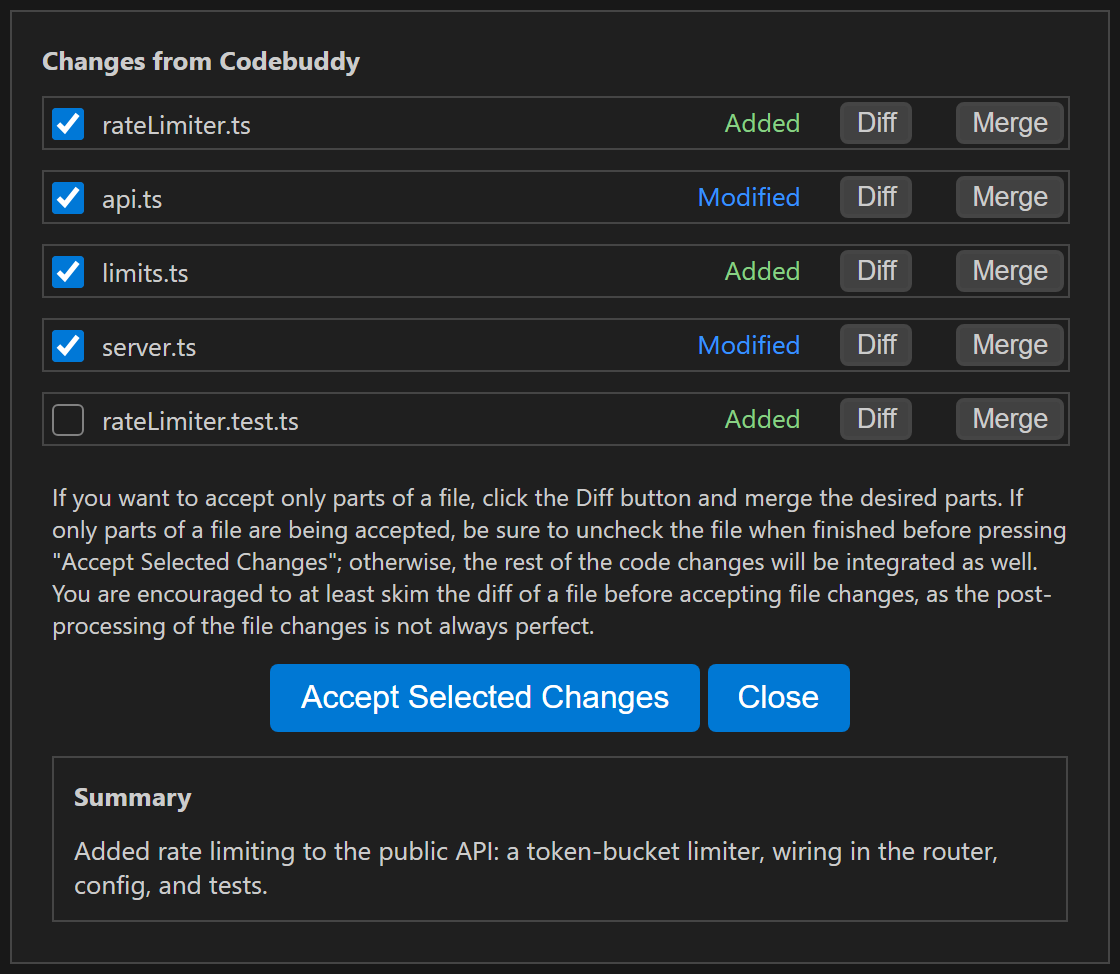
Each changed file has its own checkbox; only what you tick is applied.
Install for VS Code · Install for JetBrains · See pricing
GitHub Copilot
Best for: VS Code users who want on-device dictation, plus an experimental voice conversation on individual plans
Strengths
- Built-in dictation in chat, editors and terminals, on-device on desktop, so audio doesn't leave your machine. [3]
- Experimental Voice Mode reads the agent's replies aloud and listens for follow-ups. [3]
Limitations
- Voice Mode is experimental, needs an individual Copilot plan, and isn't available on Copilot Business or Enterprise. [3]
- We found no voice feature documented for Copilot in JetBrains IDEs. [9]
Vendor site: github.com/features/copilot
Cursor
Best for: Developers who want a realtime voice conversation with an agent, in an AI-first editor
Strengths
- Realtime voice chat with agents: describe a change out loud and hear updates, alongside dictation into the chat input. [4]
- With Privacy Mode on, voice chat runs with zero data retention. [4]
Limitations
- It's its own editor, not a plugin for VS Code or JetBrains IDEs. [10]
Vendor site: cursor.com
Claude Code
Best for: Claude Code users who want push-to-talk dictation in the terminal or VS Code
Strengths
- Push-to-talk dictation tuned for coding vocabulary, that doesn't use Claude messages or tokens. [12]
Limitations
- Audio is streamed to Anthropic's servers; it isn't processed locally. [12]
- Needs a Claude.ai account login, and doesn't work over SSH or in VS Code Remote sessions. [12]
- Dictation only: the voice docs don't cover replies read aloud. [12]
Vendor site: code.claude.com
Kilo Code
Best for: Kilo Code users who want speech-to-text in VS Code, including through their own Whisper server
Strengths
- Speech-to-text in prompt fields, through Kilo Gateway or any OpenAI-compatible endpoint, including a self-hosted Whisper server. [14]
Limitations
- Needs FFmpeg and the Kilo provider, and works only in local VS Code windows, not Remote-SSH, WSL or dev containers. [14]
Vendor site: kilo.ai
Devin Desktop (formerly Windsurf)
Best for: Windsurf users who want to keep its Cascade agent, in its editor or JetBrains plugin
Strengths
- Voice input in Cascade, documented for both the Devin Desktop editor and the JetBrains plugin. [15][16]
Limitations
- Windsurf is now Devin Desktop (windsurf.com redirects there), and its docs call Cascade legacy. [21][15]
- Voice input is speech-to-text only; the docs don't mention replies read aloud. [15]
Vendor site: devin.ai/desktop
System-wide voice tools
These aren't coding assistants. They turn speech into input for any app, including your IDE and its AI chat, so they work alongside any tool above.
- Talon: Hands-free input for the whole computer: commands, dictation and custom voice commands, plus mouse control, on macOS, Windows and Linux. Talon 1.0 (Sep 20, 2026) added new GPU-accelerated speech models. [5][22]
- Superwhisper: Dictation on Mac, Windows, iOS and Android that works offline; its offline models run best on Apple Silicon Macs. [23]
- Wispr Flow: Dictation on Mac, Windows, iOS and Android, with a free tier that has a weekly usage limit. [24]
When Codebuddy isn't the right fit
Codebuddy's voice is push-to-talk for describing and reviewing changes, and your speech is transcribed in the cloud. If your audio must stay on your machine, VS Code's on-device dictation or an offline tool like Superwhisper suits you better. If you need to control your whole computer hands-free, Talon is built for that. [1][3][23][5]
FAQ
Can you code by voice in VS Code?
Yes. VS Code has built-in dictation for chat, editors and terminals, and an experimental Voice Mode for individual Copilot plans. Codebuddy and Kilo Code add voice input in their own VS Code extensions. [3][2][14]
Which AI coding assistants have voice in JetBrains IDEs?
Of the tools we checked, Codebuddy's JetBrains plugin has two-way voice (it speaks its plan back), and Devin Desktop's JetBrains plugin (formerly Windsurf) documents voice input. We found no voice feature documented for Copilot or JetBrains AI Assistant in JetBrains IDEs. [1][16][9][17]
Is my voice processed on my computer?
It depends on the tool. VS Code's desktop dictation runs on-device. Claude Code streams audio to Anthropic's servers, Kilo Code uses Kilo Gateway or an endpoint you choose, and Codebuddy uses a cloud speech-to-text service. [3][12][14][1]
Which tools read the AI's reply aloud?
Codebuddy reads its plan back, Copilot's experimental Voice Mode reads replies aloud, and Cursor's voice chat lets you hear updates from the agent. Claude Code's voice feature is dictation only. [1][3][4][12]
What does "stay close to your code" mean?
It's what Codebuddy is built around: it writes a plan first by default, you steer it, and then you tick which changes in the diff get applied. Voice is one more way to steer. [6]
Is Codebuddy the same as Tencent CodeBuddy?
No. Codebuddy (www.codebuddy.ca) is a separate product, and it isn't affiliated with Tencent Cloud's CodeBuddy or with codebuddy.com.
Sources
- JetBrains Marketplace: Codebuddy plugin 22666. https://plugins.jetbrains.com/plugin/22666-codebuddy (checked 2026-11-17)
- Visual Studio Marketplace: Codebuddy (CodebuddyAI.codebuddy-ai). https://marketplace.visualstudio.com/items?itemName=CodebuddyAI.codebuddy-ai (checked 2026-11-17)
- VS Code docs: Voice (dictation and Voice Mode). https://code.visualstudio.com/docs/configure/accessibility/voice (checked 2026-11-17)
- Cursor changelog: Voice chat with agents. https://cursor.com/changelog/voice-chat (checked 2026-11-17)
- Talon Voice homepage. https://talonvoice.com/ (checked 2026-11-17)
- Codebuddy homepage explainer video, captions ("made for developers who want to stay close to their code"). https://www.codebuddy.ca/images/videos/explainer-2026-11-desktop.vtt (checked 2026-11-17)
- Codebuddy homepage: features and workflow. https://www.codebuddy.ca/ (checked 2026-11-17)
- JetBrains Marketplace: GitHub Copilot plugin 17718 (listing description). https://plugins.jetbrains.com/plugin/17718 (checked 2026-11-17)
- GitHub Docs: Copilot Chat in JetBrains IDEs (Edit mode, plan mode). https://docs.github.com/en/copilot/how-tos/chat-with-copilot/chat-in-ide?tool=jetbrains (checked 2026-11-17)
- Cursor docs: Agent overview. https://cursor.com/docs/agent/overview (checked 2026-11-17)
- Claude Code docs: VS Code extension (diffs, plan mode, checkpoints). https://code.claude.com/docs/en/vs-code (checked 2026-11-17)
- Claude Code docs: Voice dictation. https://code.claude.com/docs/en/voice-dictation (checked 2026-11-17)
- JetBrains Marketplace: Kilo Code plugin 28350 (listing description). https://plugins.jetbrains.com/plugin/28350 (checked 2026-11-17)
- Kilo Code docs: Speech-to-text. https://kilo.ai/docs/code-with-ai/features/speech-to-text (checked 2026-11-17)
- Devin Desktop docs: Cascade (voice input; windsurf docs redirect here). https://docs.devin.ai/desktop/cascade/cascade (checked 2026-11-17)
- Devin docs: Cascade in the JetBrains plugin (voice input). https://docs.devin.ai/windsurf/plugins/cascade/cascade-overview.md (checked 2026-11-17)
- JetBrains Marketplace: JetBrains AI Assistant plugin 22282 (listing description). https://plugins.jetbrains.com/plugin/22282 (checked 2026-11-17)
- JetBrains Marketplace: Cline plugin 28247 (listing description). https://plugins.jetbrains.com/plugin/28247 (checked 2026-11-17)
- GitHub: Codebuddy-ai organization (plugin source is not published). https://github.com/Codebuddy-ai (checked 2026-11-17)
- Codebuddy pricing: plans, BYOK option and model list. https://www.codebuddy.ca/pricing (checked 2026-11-17)
- windsurf.com (redirects to devin.ai/desktop). https://windsurf.com/ (checked 2026-11-17)
- Talon changelog: Talon 1.0 (Sep 20, 2026). https://talonvoice.com/dl/latest/changelog.html (checked 2026-11-17)
- Superwhisper homepage. https://superwhisper.com/ (checked 2026-11-17)
- Wispr Flow pricing. https://wisprflow.ai/pricing (checked 2026-11-17)
Codebuddy (www.codebuddy.ca) is not affiliated with Tencent Cloud's CodeBuddy or with codebuddy.com. Product names are trademarks of their owners. This post compares publicly listed features and prices. If something has changed, tell us on Discord.