Last checked 2026-11-14. Written by the Codebuddy team: we make one of the tools in this comparison, and we say where it isn't the right pick. Every claim links to a dated source at the end.
Continue was acquired by Cursor, and its JetBrains plugin is now community-maintained. Choosing what comes next is mostly a question of how you want to work with AI: hand a task to an agent and review what comes back, or stay close to your code and follow each change as it's made. Here's how the options compare, with a source for every claim.
TL;DR
- Want to stay close to your code? Codebuddy (codebuddy.ca) is made for that. By default it writes a plan before any code; you read it, question it and steer it, then tick which changes in the diff get applied. You follow every change, so you still know how your code works. It has native plugins for VS Code and JetBrains and 17 hosted models. It isn't open source and doesn't run local models. [1][2][3]
- Need open source or local models? Kilo Code is the closest like-for-like replacement, with open-source VS Code and JetBrains extensions, your own keys, and Ollama or LM Studio. Cline is similar, and asks you to approve every file change. [4][5][6]
- Want agents that work on their own? GitHub describes Copilot's agent mode as "an autonomous coding companion", JetBrains AI Assistant offers Junie, Codex and Claude Agent, and Kilo Code runs several agents in parallel worktrees. [7][8][9]
- Already on GitHub? Copilot runs in both IDEs and has a free tier. [10]
Stay close to your code
"You ask an AI tool for one change. It goes off on its own, edits twelve files, and comes back with, done. Now you own code you never really read." [1]
You're still the one who answers for that code, and a giant change with pages of edited files is hard to review at the end. Codebuddy works differently. Before any code gets written, it writes a plan, by default. You read it, question it, and steer it, until it's what you would have done. [1]
Confirm the plan and you get a diff in your editor's own viewer. Tick the changes you want, and only those get applied. You catch problems early, and you still know how your code works, because you were there for every decision. [1][2]
That's the lens for this post. Alongside the things Continue users chose it for, we compared how each tool brings its changes to you, in its vendor's own words.
What happened to Continue
- Continue's homepage now reads "Continue was acquired by Cursor", and says its open-source codebase "remains freely available as a foundation for others". [11]
- On JetBrains Marketplace the Continue plugin is tagged deprecated, with the note: "The JetBrains plugin is now community-maintained. We strongly recommend using the Continue CLI instead." [12]
- Its most recent VS Code release on GitHub was published on 2026-06-19. [13]
So Continue isn't gone: the code is open and the CLI is recommended. But if you relied on its JetBrains plugin, or you want an actively developed tool in both IDEs, you may want something else.
How we compared them
The first column is how each tool works with you, in its vendor's own words: whether you follow and approve changes as they happen, or hand work to an agent. After that come the things Continue users chose it for: it works in both VS Code and JetBrains, you choose the model, you can bring your own API key or run local models, and it's open source. Every cell links to a source on the vendor's own site, docs, repository or marketplace listing. A cell reads "Not stated" where we couldn't find a primary source.
Side by side
| Tool | How it works with you | VS Code | JetBrains | Model choice | Your own API key | Local models | Open source | Starts at |
|---|---|---|---|---|---|---|---|---|
| Codebuddy | Writes a plan first, by default; you tick which changes in the diff get applied [1] | Yes [14] | Yes [15] | 17 hosted models [3] | Yes: one OpenRouter key covers every model, or OpenAI and Anthropic keys [3] | No [3] | No [16] | Free with your own API keys (personal projects); plans from $10/month [3] |
| Kilo Code | A "multi-agent control room": several agent sessions at once, each in its own git worktree [9] | Yes [4] | Yes [4][9] | Yes, through your own provider keys [4] | Yes [4] | Ollama, LM Studio [4] | Yes (MIT) [17] | Free for individuals; AI usage billed separately [4] |
| GitHub Copilot | Completions, Ask, and an Agent mode GitHub calls "an autonomous coding companion"; a plan agent for upfront plans [7] | Yes [10] | Yes [10][7] | Yes (Claude, GPT, Gemini, Grok and more) [10] | In VS Code chat (not inline completions) [18] | Ollama, in VS Code chat [18] | Not stated | Free tier; Pro $10/month [10] |
| JetBrains AI Assistant | Inline help and next-edit suggestions, plus coding agents (Junie, OpenAI Codex, Claude Agent) [8] | Yes (VS Code extension) [19] | Yes [8] | Yes [20] | Yes (Anthropic, Google, OpenAI, OpenAI-compatible) [20] | Ollama, LM Studio (not for agents) [20] | Not stated | AI Free tier; paid tiers add more AI credits [21] |
| Cline | An agent with "a human-in-the-loop GUI to approve every file change and terminal command" [5] | Yes [22] | Yes [23][5] | Yes [22] | Yes [22] | Ollama, LM Studio [6] | Yes (Apache-2.0) [24] | Free for individuals; AI usage billed separately [22] |
| Keep using Continue | Now pitched as "source-controlled AI checks, enforceable in CI"; the CLI is recommended [12] | Extension listed; last release 2026-06-19 [13] | Community-maintained; marked deprecated [12] | Not stated | Not stated | Ollama [25] | Yes (Apache-2.0) [26] | Free (open source) [26] |
Prices are list prices for one person, in USD, from each vendor's own page on the date checked. "Not stated" means we couldn't find a primary source.
Tabnine isn't listed: its JetBrains plugin says it no longer onboards new users, and tabnine.com/pricing now redirects to tricentis.com. [27][28]
The options, one by one
Codebuddy
Best for: Developers who want to stay close to their code: a plan they steer, then a diff they tick, one change at a time, in VS Code and JetBrains
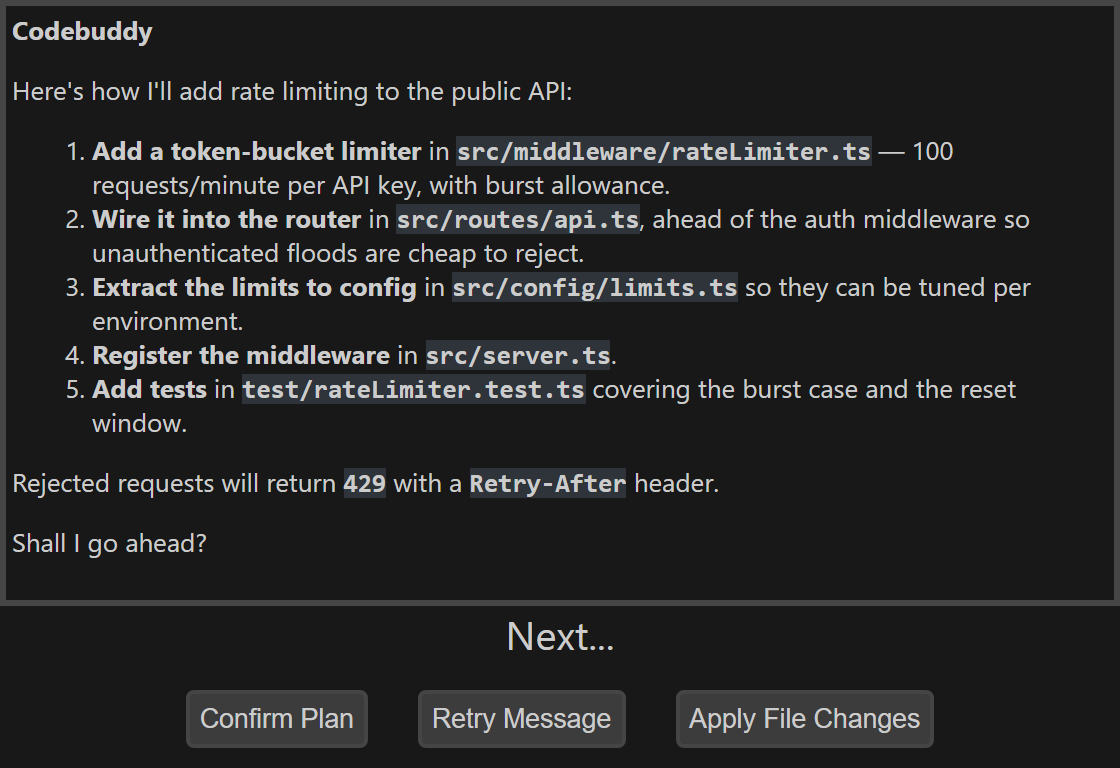
Codebuddy's plan, shown before any file changes.
Strengths
- Made for developers who want to stay close to their code. Before any code gets written it writes a plan, by default, and you read it, question it and steer it until it's what you would have done. [1]
- Every change comes back as a diff in VS Code's merge editor or JetBrains' own diff viewer, and only the changes you tick get applied, so you catch problems early. [2][1]
- You follow every change as it happens, so you still know how your code works, because you were there for every decision. [1]
- You decide which files the AI gets to see. [2][1]
- Native plugins for VS Code and JetBrains IDEs, not an editor fork. One plan covers both. [2][3]
- Choice of 17 hosted models from several providers, each priced per request in credits. [3]
- Two-way voice: describe the change out loud and it reads the plan back to you. [2]
Limitations
- Not built for handing a big task to an agent and coming back to a finished result: it is designed around you following one change at a time. [1]
- Not open source: the plugin source isn't published. [16]
- No local models: it doesn't run Ollama or LM Studio models. [3]
- A much smaller user base than the big names here: 79,781 VS Code Marketplace installs on 2026-11-14. [14]
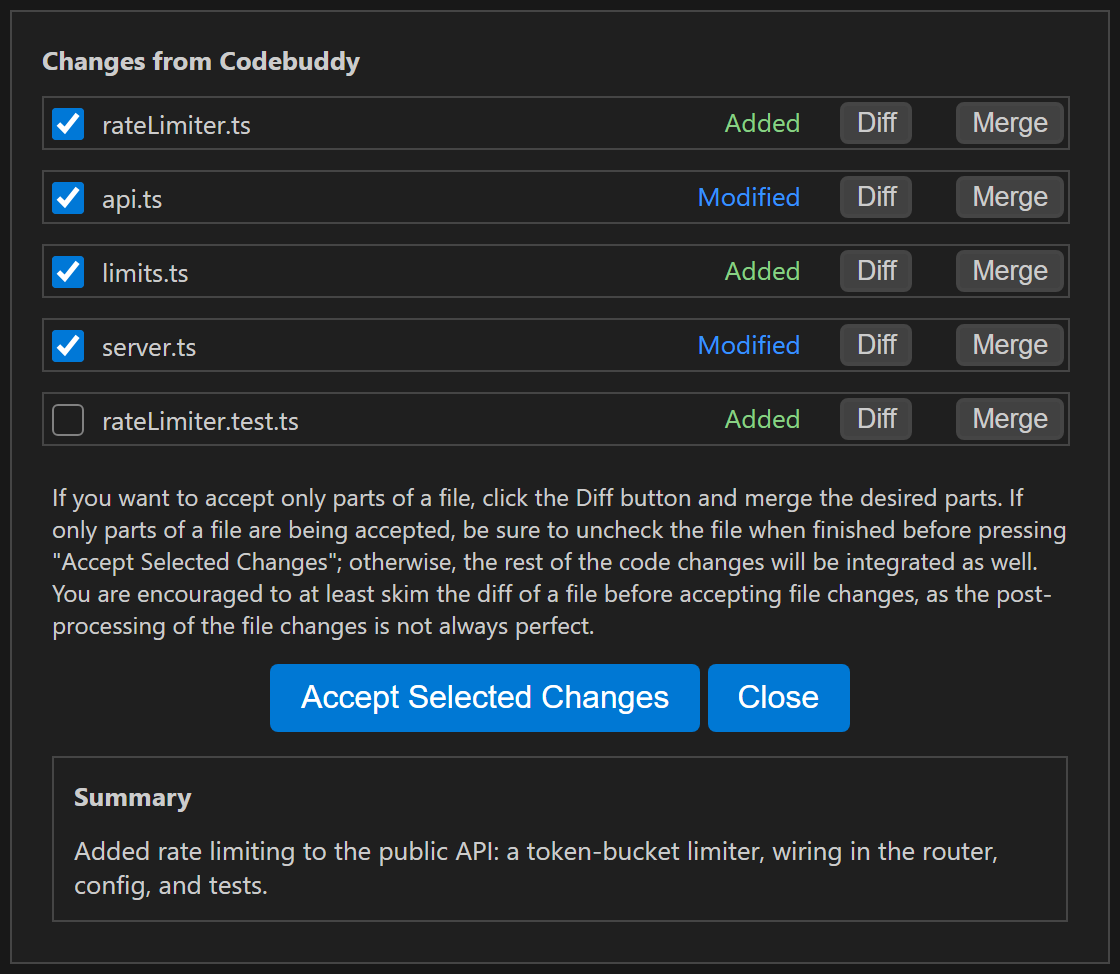
Each changed file has its own checkbox; only what you tick is applied.
Install for VS Code · Install for JetBrains · See pricing
Kilo Code
Best for: Running several agents in parallel, with open-source extensions, your own API keys and local models
Strengths
- An Agent Manager that runs several agent sessions at once, each isolated in its own git worktree, with diffs against the base branch. [9]
- Open-source extensions for VS Code, JetBrains and the command line. [4][17]
- Bring your own Anthropic, OpenAI, Google, Azure, AWS Bedrock or other provider keys. [4]
- Runs local models through Ollama or LM Studio. [4]
Limitations
- The platform is free for individuals, but AI inference is billed separately by usage. [4]
Vendor site: kilo.ai
GitHub Copilot
Best for: Teams on GitHub who want completions, chat and an autonomous agent mode, with a free tier
Strengths
- Completions, Ask mode, and an Agent mode that can fix errors, run commands and iterate on feedback; a plan agent writes detailed implementation plans upfront. [7]
- Available in VS Code, JetBrains IDEs and many other editors. [10]
- Model choice across Anthropic Claude, OpenAI GPT, Google Gemini, xAI Grok and others. [10]
- A free tier with no credit card, and paid plans from $10/month. [10]
- 57 million JetBrains Marketplace downloads, the most of any non-JetBrains plugin in this post (checked 2026-11-14). [7][9][5][15][12]
Limitations
- The free tier is capped at 2,000 code completions a month. [10]
- Your own keys and local Ollama models are documented for VS Code chat, and they don't cover inline completions. [18]
Vendor site: github.com/features/copilot
JetBrains AI Assistant
Best for: JetBrains users who want JetBrains' own assistant and a choice of coding agents
Strengths
- Made by JetBrains and built around the IDE's own code intelligence. [8]
- A choice of coding agents in one chat: Junie, OpenAI Codex, Claude Agent, or third-party agents. [8]
- Can use models from Anthropic, Google, OpenAI or any OpenAI-compatible endpoint, plus local models through Ollama or LM Studio. [20]
- Also available as a VS Code extension. [19]
- An AI Free tier, and AI Pro is included with the All Products Pack. [21]
Limitations
- Its agents can't use local models, and some features may be unavailable with third-party models. [20]
- AI Free isn't available in Android Studio or in the Community editions of IntelliJ IDEA and PyCharm. [21]
Vendor site: plugins.jetbrains.com/plugin/22282-jetbrains-ai-assistant
Cline
Best for: An open-source agent that asks you to approve each file change and command, with your own keys or local models
Strengths
- Asks you to approve every file change and terminal command, so you stay in the loop while it works through a task step by step. [5]
- Open source, and free for individual developers. [22][24]
- Bring your own API keys or use Cline's own provider. [22]
- Runs local models through Ollama or LM Studio. [6]
Limitations
- You pay for AI inference separately, by usage. [22]
- Cline's pricing page lists the JetBrains extension under its Enterprise tier, while its docs describe a normal Marketplace install. Check which applies before rolling it out to a team. [22][23]
Vendor site: cline.bot
Keep using Continue
Best for: Staying put: you're happy with Continue's open-source code and don't depend on the JetBrains plugin
Strengths
- The open-source codebase is still freely available, and the repository is still receiving commits. [11][26]
- Works with local models through Ollama. [25]
Limitations
- Continue was acquired by Cursor, and its JetBrains plugin is now community-maintained and marked deprecated. [11][12]
- Continue itself recommends its CLI over the JetBrains plugin. [12]
Vendor site: continue.dev
When Codebuddy isn't the right fit
Codebuddy is built for developers who want to stay close to their code, one reviewed change at a time. If you'd rather hand a task to an agent and come back to a finished result, or run several agents in parallel, tools built around agents suit you better: Copilot's agent mode, JetBrains AI Assistant's coding agents or Kilo Code's Agent Manager. And if the tool itself must be open source, or your code can't leave your machine, Kilo Code, Cline or Continue itself are better choices. [1][7][8][9][4][24][6][26]
FAQ
Is Continue.dev shut down?
No. Continue was acquired by Cursor and its open-source code is still available on GitHub. Its JetBrains plugin is now community-maintained and marked deprecated on JetBrains Marketplace, where Continue recommends its CLI instead. [11][26][12]
What does "stay close to your code" mean?
It's what Codebuddy is built around. Instead of an AI tool that goes off on its own and comes back with a dozen edited files, Codebuddy writes a plan first by default, you steer it, and then you tick which changes in the diff get applied. You follow each change as it's made, so you understand the code you own and stay part of how it's designed. [1]
Which Continue alternatives let me approve each change?
Codebuddy shows each change as a diff in your IDE's own viewer and applies only the changes you tick. Cline provides a human-in-the-loop interface to approve every file change and terminal command. [2][1][5]
What is the closest open-source replacement for Continue?
Kilo Code and Cline are both open source, both have VS Code and JetBrains plugins, and both support your own API keys and local models through Ollama or LM Studio. [4][17][24][23][6]
Which alternatives can run local models with Ollama?
Kilo Code and Cline support Ollama and LM Studio. JetBrains AI Assistant supports them too, but not for its agents. GitHub documents Ollama for Copilot chat in VS Code. Codebuddy does not run local models. [4][6][20][18][3]
How much does Codebuddy cost?
Codebuddy is free for personal projects with your own API keys: one OpenRouter key covers every model. Paid plans start at $10/month and include monthly credits that carry over. Current prices are on the pricing page. [3]
Is Codebuddy the same as Tencent CodeBuddy?
No. Codebuddy (www.codebuddy.ca) is a separate product, and it isn't affiliated with Tencent Cloud's CodeBuddy or with codebuddy.com.
Sources
- Codebuddy homepage explainer video, captions ("made for developers who want to stay close to their code"). https://www.codebuddy.ca/images/videos/explainer-2026-11-desktop.vtt (checked 2026-11-14)
- Codebuddy homepage: features and workflow. https://www.codebuddy.ca/ (checked 2026-11-14)
- Codebuddy pricing: plans, BYOK option and model list. https://www.codebuddy.ca/pricing (checked 2026-11-14)
- Kilo Code pricing. https://kilo.ai/pricing (checked 2026-11-14)
- JetBrains Marketplace: Cline plugin 28247 (listing description). https://plugins.jetbrains.com/plugin/28247 (checked 2026-11-14)
- Cline docs: Ollama provider (local models with Ollama or LM Studio). https://docs.cline.bot/provider-config/ollama (checked 2026-11-14)
- JetBrains Marketplace: GitHub Copilot plugin 17718 (listing description). https://plugins.jetbrains.com/plugin/17718 (checked 2026-11-14)
- JetBrains Marketplace: JetBrains AI Assistant plugin 22282 (listing description). https://plugins.jetbrains.com/plugin/22282 (checked 2026-11-14)
- JetBrains Marketplace: Kilo Code plugin 28350 (listing description). https://plugins.jetbrains.com/plugin/28350 (checked 2026-11-14)
- GitHub Copilot plans and pricing. https://github.com/features/copilot/plans (checked 2026-11-14)
- continue.dev homepage: "Continue has joined Cursor". https://continue.dev/ (checked 2026-11-14)
- JetBrains Marketplace: Continue plugin 22707 (tagged deprecated, "now community-maintained"). https://plugins.jetbrains.com/plugin/22707 (checked 2026-11-14)
- GitHub: Continue v2.1.0 VS Code release, published 2026-06-19. https://github.com/continuedev/continue/releases/tag/v2.1.0-vscode (checked 2026-11-14)
- Visual Studio Marketplace: Codebuddy (CodebuddyAI.codebuddy-ai). https://marketplace.visualstudio.com/items?itemName=CodebuddyAI.codebuddy-ai (checked 2026-11-14)
- JetBrains Marketplace: Codebuddy plugin 22666. https://plugins.jetbrains.com/plugin/22666-codebuddy (checked 2026-11-14)
- GitHub: Codebuddy-ai organization (plugin source is not published). https://github.com/Codebuddy-ai (checked 2026-11-14)
- GitHub: Kilo-Org/kilocode repository (MIT). https://github.com/Kilo-Org/kilocode (checked 2026-11-14)
- VS Code blog (2026-06-18): Use your own language model key in VS Code. https://code.visualstudio.com/blogs/2026/06/18/byok-vscode (checked 2026-11-14)
- Visual Studio Marketplace: AI Assistant by JetBrains. https://marketplace.visualstudio.com/items?itemName=JetBrains.jetbrains-ai-assistant (checked 2026-11-14)
- JetBrains AI Assistant help: Use custom models (third-party providers and local models). https://www.jetbrains.com/help/ai-assistant/use-custom-models.html (checked 2026-11-14)
- JetBrains AI Assistant help: Licensing and subscriptions. https://www.jetbrains.com/help/ai-assistant/licensing-and-subscriptions.html (checked 2026-11-14)
- Cline pricing. https://cline.bot/pricing (checked 2026-11-14)
- Cline docs: Installing Cline in JetBrains. https://docs.cline.bot/getting-started/installing-cline-jetbrains (checked 2026-11-14)
- GitHub: cline/cline repository (Apache-2.0). https://github.com/cline/cline (checked 2026-11-14)
- Continue docs: Using Ollama with Continue. https://docs.continue.dev/guides/ollama-guide (checked 2026-11-14)
- GitHub: continuedev/continue repository (Apache-2.0). https://github.com/continuedev/continue (checked 2026-11-14)
- JetBrains Marketplace: (Legacy) Tabnine plugin 12798, "does not onboard new users". https://plugins.jetbrains.com/plugin/12798 (checked 2026-11-14)
- tabnine.com/pricing (redirects to tricentis.com). https://www.tabnine.com/pricing/ (checked 2026-11-14)
Codebuddy (www.codebuddy.ca) is not affiliated with Tencent Cloud's CodeBuddy or with codebuddy.com. Product names are trademarks of their owners. This post compares publicly listed features and prices. If something has changed, tell us on Discord.